Introduction
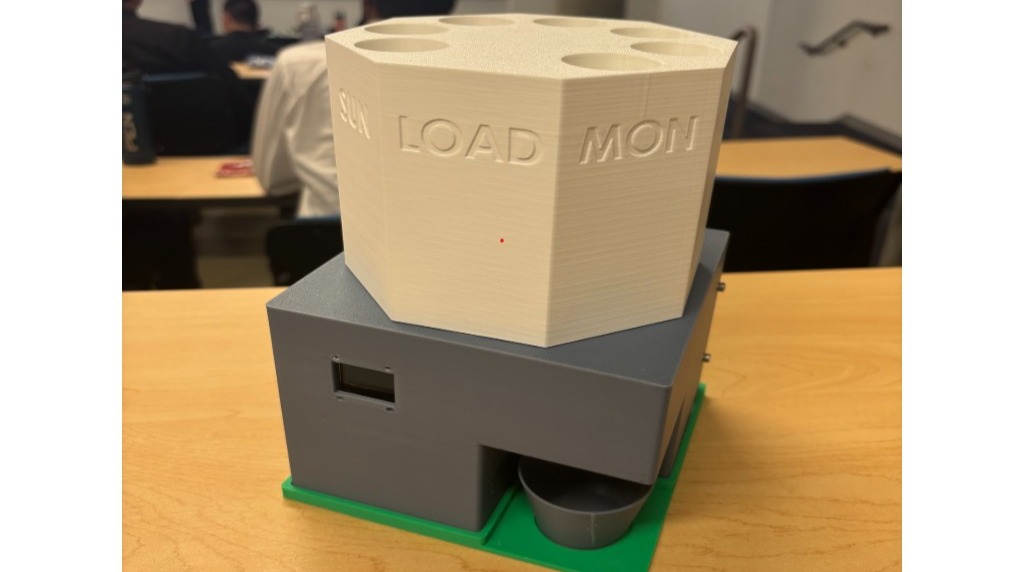
In this guide, we'll build a smart automatic pill dispenser that schedules daily medication, dispenses doses with a stepper motor-driven carousel, and uses camera verification to verify whether the pills were taken while alerting users or caregivers using an iOS app.
Github Link (contains code and CAD files): https://github.com/shashanksanig102/MedSync-Automatic-Pill-Dispenser
Prerequisites
ESP32 development setup with PlatformIO installed
Soldering tools and jumper wires
Access to 3D-printing services
Xcode (for building the iOS app)
Free Supabase Account for cloud storage and backend database setup
| Component | Qty | Notes |
|---|---|---|
| Freenove ESP32-S3-WROOM (with built-in OV2640 camera) | 1 | - |
| 28BYJ-48 Stepper Motor with ULN2003 Driver Board | 1 | - |
| SSD1306 0.96" I2C OLED Display | 1 | - |
| 5V USB-C Power Supply | 1 | - |
| M3 Screws (6-10 mm) & Nuts | 6 | 4 for backing, 2 for microcontroller mount |
| M1.2 Screws (6-10 mm) & Nuts | 4 | 4 for attaching OLED display |
| Perfboard | 1 | - |
Set Up
Set up the Supabase backend and flash the firmware to your ESP32-S3 board.
Create a public bucket named
pill-photosin Supabase Storage.Run
supabase_setup.sqlin the Supabase SQL Editor to initialize the database tables.Configure
include/secrets.hwith your Wi-Fi and Supabase credentials:
#pragma once
#define WIFI_SSID "your_network"
#define WIFI_PASS "your_password"
#define SUPABASE_URL "https://your-project.supabase.co"
#define SUPABASE_KEY "your_service_role_key"
#define SUPABASE_BUCKET "pill-photos"
Upload firmware using PlatformIO:
pio run --target uploadBuild
Assemble the hardware components and pair the device with the companion iOS app.
Wire and solder the stepper driver and OLED display to the ESP32 according to the GPIO pin mapping onto a perfboard:
Stepper (IN1–IN4): GPIO 1, 2, 42, 41
OLED (SDA / SCL): GPIO 39, 40
Attach the ESP32 to the mount and subsequently screw it into the base, making sure to
Mount the 3D-printed 8-slot carousel onto the stepper motor shaft (Slots 0–6 hold Mon–Sun doses; Slot 7 acts as the blocked loading slot).
Open
ios/MedSyncApp/MedSyncApp.swiftin Xcode and deploy the app to your iOS device over Bluetooth.
Verify
Calibrate the physical carousel alignment and confirm end-to-end functionality.
Connect to the device via BLE using the Controls tab in the iOS app.
Hand-rotate the carousel until Slot 0 (Monday) is centered over the dispense hole, then tap Calibrate Home.
Trigger a manual DISPENSE command from the app to verify 45° rotation and immediate photo upload to Supabase (should be visible on app).
Testing & Verification
Trigger a dispense cycle and verify the built-in camera captures an image and performs RGB565 saturation analysis to detect pills in the cup.
Optional: Run
python scripts/cv_processor.pyon a host machine to test higher-accuracy OpenCV-based pill verification and automated 14-day record cleanup.
Improvements & Enhancements
Enhanced Pill Detection: The current on-device algorithm relies on RGB565 color saturation analysis, which excels with brightly colored pills against a light cup but can struggle with all-white pills. Integrating the optional OpenCV Python backend enables morphological filtering and Hough circle detection for higher accuracy across all pill types.
Physical Sensors: Add an ambient light sensor or an infrared proximity sensor inside the collection cup to detect when the patient physically removes the dispensed pills, providing a second layer of intake verification beyond camera analysis.
Battery Backup: Implement an 18650 Li-ion battery shield with UPS functionality so the device maintains real-time clock tracking, scheduled dispensing, and Bluetooth connectivity during power outages rather than solely rely on USB-C power.